SesameDVR
SesameDVR is a full-featured DVR/media server for video surveillance and IPTV with Low-Latency HLS (LL-HLS) support.
It runs on a Linux server, accepts RTSP/HTTP/HTTPS streams, upstream HLS sources, UDP multicast, Shoutcast/radio streams and push delivery over SRT/RTMP, records a local video archive, serves live and archived video over HTTP/WebRTC, can restream selected feeds to UDP Multicast, and includes a web admin interface for stream management, storage, clients, ONVIF events and diagnostics.
Try SesameDVR
Request a personal trial key for one server installation. The setup command includes your selected server UI language.
Live demo
Open public live streams in the same embeddable SesameDVR player that can be used in customer portals, monitoring systems and operator dashboards.
Demo-1
Live stream with ONVIF event markers.
Demo-2
Stream with Timelapse recording. Select the mode in the top-right corner.
Who it is for
SesameDVR is useful for:
- integrators who need to deploy a local DVR/NVR quickly;
- telecom operators and building operators who need API access to live and archived camera video;
- sites with IP cameras: offices, warehouses, construction sites, industrial and remote locations;
- SmartYard/RBT deployments that need a compatible DVR backend for camera preview, archive and playback;
- IPTV networks where operators need a CatchUP archive for TV channels.
The main value is a controlled local or operator-side video archive with web access, API, embeddable player, clear diagnostics and flexible storage options.
Key features
- recording from IP cameras and other RTSP/HTTP/HTTPS sources;
- end-to-end encryption for stored video streams with Sesame Agent: camera streams are encrypted on the local network before upload, SesameDVR stores only encrypted segments and CEKs, and the owner's private key never reaches the server;
- primary and fallback stream sources: one stream can have several ordered source candidates, so SesameDVR can use a backup source when the primary one is unavailable;
- HLS passthrough source mode: SesameDVR can accept upstream HLS streams, process master playlists, use fallback sources and deliver them into the same live/archive flow without unnecessary transcoding;
- SRT/MPEG-TS and RTMP/FLV push ingest for remote sites and edge-agent scenarios;
- support for UDP multicast sources;
- UDP Multicast restreaming for selected feeds consumed by downstream systems in operator and corporate networks;
- support for Shoutcast/radio streams in audio-only, internet radio and service audio channel scenarios;
- static JPEG/image source mode for placeholders, demo streams and integrations that periodically update one image;
- looped video file source mode for demo stands, test environments, showroom displays and training streams without a live camera;
- audio passthrough/transcoding options for scenarios where the camera audio codec is not suitable for the client application or browser;
- live HLS, LL-HLS, multi-bitrate HLS and native WebRTC/WHEP playback;
- live-only mode with a separate live buffer for temporary segments and previews, so streams that do not need archive recording do not pollute archive storage or retention queues;
- archive playback by time range, including a sliding archive playlist mode for long archive sessions;
- timelapse recording and playback for quickly reviewing long periods;
- MP4 archive export;
- ONVIF discovery and event collection: motion detector events are attached to the stream and help users jump through the archive faster;
- motion-only archive playback based on ONVIF motion events;
- additional storage for archive fragments covered by ONVIF events beyond the continuous recording depth, with limits by disk space, retention time and total event-fragment duration;
- FailOver stream reservation between Master and Backup DVR nodes: the Backup node is preconfigured, starts recording after a stable Master stream problem, and the Master can later fetch missing segments and merge indexes after recovery;
- optional seamless FailOver with a short buffer on the Backup node: the Backup continuously keeps the latest segments to reduce the gap during switchover;
- cluster reservation schemes where remaining DVR nodes temporarily take over streams from a failed node, for example 6 servers with 1000 cameras each redistributed across the remaining 5 nodes;
- SingleVolume and MultiVolume archive storage with independent per-volume catalogs, several distribution policies and optimizations for multi-disk arrays;
- Flussonic API compatibility, so existing solutions that already work with Flussonic can be integrated with SesameDVR;
- playback authorization through an Auth Backend, a static token, or no authorization mode;
- camera preview as MP4/JPEG;
- OpenMetrics/Prometheus endpoint
/metricsfor external monitoring, Grafana and alerting, with access modes: disabled, no authorization, Bearer token or Basic auth; - client monitoring: active playback users, WebRTC sessions and recent HLS clients;
- stream management via UI, HTTP API and CLI;
Screenshots
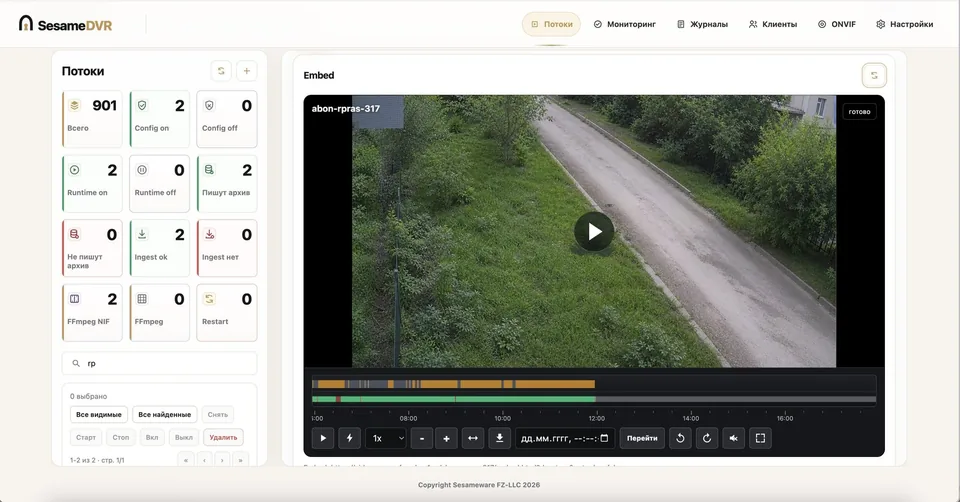
Stream management: status, playback tabs and per-camera controls.
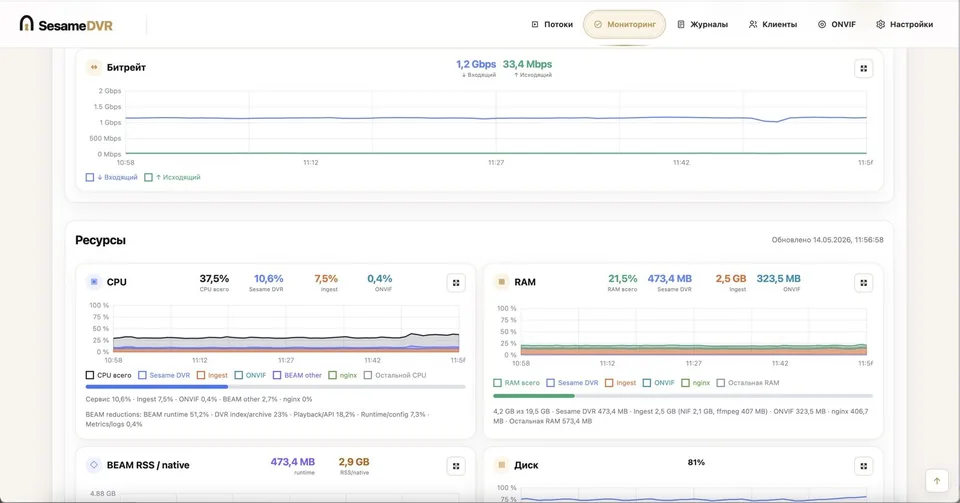
Server monitoring dashboard with system and stream metrics.
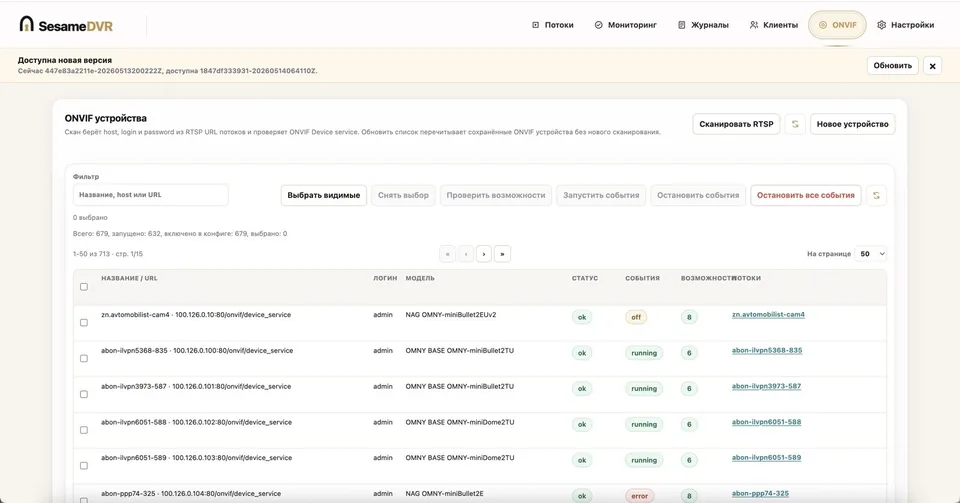
ONVIF motion events attached to camera streams for faster archive navigation.
Playback and API
The embedded player supports live playback, archive timeline navigation, ONVIF event markers, motion-only archive viewing, MP4 export, current-frame screenshot capture, pinch/zoom in embedded scenarios, and an external settings action for jumping from the player to camera settings or another management UI. Live playback can use HLS, multi-bitrate HLS or native WebRTC/WHEP, with HLS fallback when the browser or codec is not suitable for WebRTC.
Streams can be configured for normal archive recording, live-only delivery with a short buffer, HLS passthrough from an upstream source, ordered fallback source candidates, or looped playback from a local video file. HLS passthrough streams can use fallback sources and are handled by the same playback, preview and archive integration layer as other stream types.
Endpoint templates:
<base-url>/<stream>/index.m3u8— live HLS playlist;<base-url>/<stream>/index.fmp4.m3u8— live HLS/fMP4 playlist;<base-url>/<stream>/index-<start>-<duration>.m3u8— archive HLS playlist for a selected time range;<base-url>/<stream>/recording_status.json— recording status and available archive intervals;<base-url>/<stream>/preview.mp4— current MP4 preview;<base-url>/<stream>/preview.jpg— current JPEG preview;<base-url>/<stream>/<yyyy>/<mm>/<dd>/<HH>/<MM>/<SS>-preview.mp4— archive MP4 preview by date and time;<base-url>/<stream>/<timestamp>-preview.jpg— archive JPEG preview by timestamp;<base-url>/<stream>/whep/— WebRTC playback endpoint.
Integration scenarios
SesameDVR can be used as:
- a standalone IP-camera archive and playback server;
- a Flussonic-compatible media server for existing video products and integrations;
- a DVR backend for SmartYard/RBT camera preview, live video and archive playback;
- an HLS passthrough layer for upstream HLS sources that need controlled access, previews, archive integration or fallback handling;
- live-only video delivery for cameras and feeds that need live playback or previews without long-term archive recording;
- a demo or test video server where streams are generated from looped video files instead of live cameras;
- video ingest from remote agents over SRT/RTMP;
- multicast video sources and UDP Multicast restreaming for selected feeds in operator and corporate networks;
- a server for Shoutcast/radio streams and audio-only channels;
- a CatchUP archive service in telecom IPTV networks;
- an embeddable video layer for customer portals, monitoring systems, billing/CRM interfaces and other web applications.
RBT integration
We have also built a dedicated RBT integration: a new plugin can automatically manage SesameDVR media servers.
When camera streams are added, removed or updated in RBT, operators do not need to do the same work twice — RBT performs the required actions on the correct SesameDVR media server automatically.
For deployments that need users, access groups, favorites, camera mosaics and a map interface, combine SesameDVR with SesamePortal.